Search It - Hidden Objects
- 4.9
- Rating
- 5.00M
- Installs
- Free
- Price

 Analysis by App-foxy
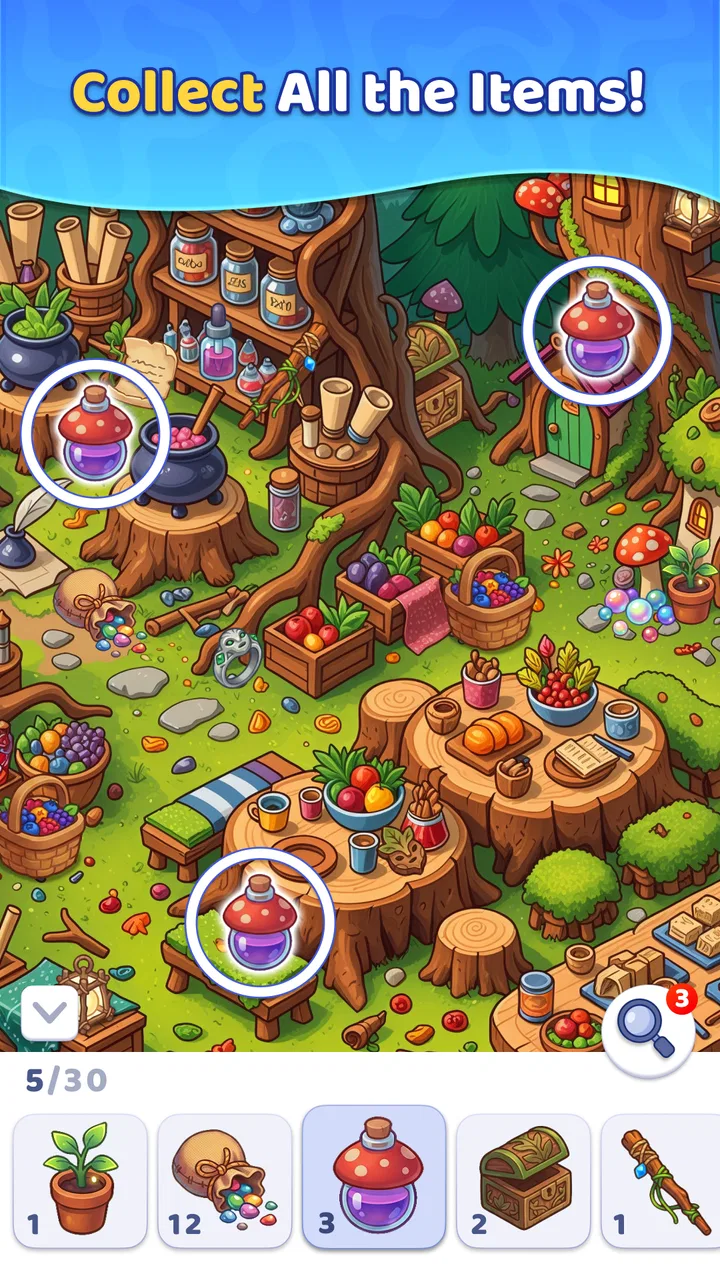
I enjoy puzzle games most when they give me something absorbing to do without demanding a long explanation, a complicated control scheme, or a competitive mindset. Search It - Hidden Objects fits that mood well. It is a free hidden-object game from Leap Game Studios, built around looking carefully, spotting details, and taking a quiet break. The store summary describes it as a way to find hidden objects and relax, and that is a fair description of the experience I would recommend it for: short, focused sessions rather than an intense gaming commitment.
What makes this particular game appealing is its clear purpose. You are not learning a large system or managing a growing collection of characters. You are concentrating on a visual scene and trying to notice what belongs there. That simplicity makes it easy to pick up, especially when I want a puzzle that starts immediately instead of asking me to remember a complicated story or tutorial.
How Search It feels during ordinary play
The first thing I look for in a hidden-object game is whether the basic loop feels comfortable. Search It presents itself as a visual search puzzle, so the quality of each session depends on how naturally I can scan the scene, recognize details, and decide where to look next. This kind of game can be relaxing when the layout is readable, but it can become tiring if every object blends into the background or if the screen feels crowded.
You May Also Like

 Blood Strike: 2.5 Anniversary
Blood Strike’s Loadouts Turn Every Drop Into a Tactical Gamble
A close look at Blood Strike’s custom loadouts: how fast access to signature weapons reshapes its battle royale rhythm, rewards preparation, and narrows the gap between fights.

 Pandora - Music & Podcasts
Pandora’s Music Is Easy to Start, but Harder to Recover
Pandora’s strength is its low-effort path from a seed to a station. Its weak spot is how much confidence it asks you to place in connection, setup, and quiet recovery.

 8 Ball Pool
 Is Built on Rivalries, Rematches, and Routine
A close look at the rivalries, rematches, shared routines, and unanswered safety questions that turn a quick pool match into a persistent mobile community.

 Samsung Music
’s Quiet Strength Is Playing What You Already Own
Its reach comes less from spectacle than from dependable access to a personal library. That simplicity is both the app’s strongest retention engine and its ceiling.

 AccuWeather: Weather Radar
AccuWeather Review: A Quick, Clear Forecast for Everyday Decisions
For everyday plans, the best forecast is the one you can understand quickly. AccuWeather makes rain timing, radar, and local conditions easy to act on, with a few trade-offs.

 Hill Climb Racing
Why Hill Climb Racing Still Turns Crashes Into One More Run
A tiny car, a bumpy hill and one more upgrade: Hill Climb Racing keeps resurfacing because its simple chaos makes every near-miss feel personal.
More From Our News Desk



In practical terms, I would approach each puzzle in passes rather than tapping randomly. I start by checking the larger shapes and unusual colors, then move toward corners, edges, and areas where several small details overlap. That habit matters here because hidden-object games reward observation more than speed alone. A player who methodically divides the screen into sections is likely to have a better time than someone who repeatedly sweeps across the same area.
The short description, “Search It,” is simple, but it also sets the right expectation. This is not a puzzle game I would choose for elaborate logic chains or word-based challenges. Its appeal comes from visual attention. If you enjoy finding small differences, scanning illustrations, and getting a modest sense of completion from each discovery, the format is easy to understand.
I also like that this style of game can fit around ordinary interruptions. I can imagine opening it while waiting for an appointment, taking a few minutes during a break, or playing before bed when I do not want a loud or demanding game. The lack of a complicated setup is one of its strongest everyday advantages.
What the speed experience depends on
Perceived speed in a hidden-object game is not only about how quickly the app opens. It also depends on how fast I can understand a scene, how clearly objects stand out, and whether the game lets me move from one discovery to the next without unnecessary friction. Search It benefits from having a narrow focus: the player knows that the task is to search, so there is little mental overhead before beginning.
That said, visual search naturally slows down as a scene becomes more detailed. I would not judge a slower moment as a technical problem by itself. Sometimes the game feels slower simply because I have already found the obvious items and am left examining tiny shapes. That is part of the puzzle’s intended tension, although it can test patience when I am looking for a single object that does not immediately fit the surrounding artwork.
My practical advice is to avoid frantic tapping. A slower, organized scan is usually more efficient than touching everywhere. It also makes the experience feel calmer and reduces the chance of overlooking an item because I rushed past it. For players who enjoy relaxing games, this is an important distinction: the best sessions are not necessarily the fastest ones.
What happens during longer or heavier sessions
A couple of quick puzzles and a longer sitting place different demands on a mobile game. During a short session, Search It is easy to understand and does not require much preparation. During a longer session, the main challenge is less about learning the controls and more about maintaining visual attention. Looking closely at similar shapes for an extended period can become tiring, particularly on a smaller phone screen.
This is where I would use a simple routine. I would play one or two scenes, pause briefly, and return with fresh eyes instead of forcing myself through a frustrating search. A short break can be more useful than tapping faster because visual fatigue makes familiar objects harder to recognize. This approach also suits the game’s relaxing identity better than treating every puzzle like a timed contest.
Heavy use can also mean opening the game repeatedly throughout the day rather than playing continuously. For that pattern, the important question is whether the game remains convenient enough to launch whenever I have a spare moment. Since its premise is immediately understandable, it has the advantage of being easy to return to. I do not need to reconstruct a story or remember a complex objective before starting the next search.
The trade-off is that players looking for constant variety in mechanics may find the experience narrower than a broader puzzle collection. Search It is centered on hidden-object play. That focus is a strength for someone who specifically wants visual searching, but it may feel limited to people who prefer switching between match puzzles, riddles, physics challenges, and word games in the same app.
Stability, interruptions, and returning to a puzzle
Reliability matters more than many players expect in a casual game. A hidden-object puzzle depends on concentration, so an interruption is especially annoying if returning to the app means losing the scene or having to repeat progress. When I use a game in short breaks, I want the experience to feel predictable rather than fragile.
Search It is available as a free game, which makes trying it straightforward, but free games often require a little awareness around optional purchases. The listed in-app purchase range runs from $0.99 to $54.99 per item. I would treat that as a reason to check purchase settings before handing the phone to a child or letting someone else play casually. The game is rated Everyone, so it is positioned for a broad audience, but an age rating does not remove the need for sensible purchase controls.
I would also avoid assuming that a puzzle app is automatically suitable for every situation. If I were playing on a device with limited storage, low battery, or a connection that is already struggling with several background tasks, I would close unused apps first and keep expectations reasonable. That is not a criticism unique to Search It; it is simply good practice when a game relies on detailed visual scenes and touch input.
Recovery is another useful way to think about reliability. If I stop halfway through a search, I want to know whether I can come back without feeling punished for taking a break. In everyday use, I would make a habit of finishing a scene before switching away when possible. That keeps the session tidy and avoids relying on an interrupted state more than necessary.
Device fit and visual comfort
The minimum operating-system requirement is Android 8.0, so the game is aimed at a wide range of Android devices rather than only the newest phones. That is helpful for players who keep an older handset, although operating-system compatibility does not guarantee the same comfort on every screen. Hidden-object games are particularly sensitive to display size, brightness, and touch accuracy.
On a compact phone, tiny objects may require more concentration, and a crowded scene can feel less inviting than it would on a larger display. I would increase brightness enough to distinguish similar shades, but not so much that the screen becomes uncomfortable in a dark room. If the phone offers a larger text or display setting, I would be cautious with it because visual scaling can sometimes change how much of a scene is visible at once.
Tablet users may have a more comfortable time simply because the search area has more physical space. That does not automatically make every puzzle easier, though. A larger display can reveal more detail while also presenting more of the scene to examine. For me, the best device is the one where I can see small objects clearly without holding the phone unusually close to my face.
Touch accuracy is worth considering as well. Players with larger fingers or a cracked screen may find precise tapping less pleasant, especially when several objects sit close together. If you prefer games that rely on broad gestures or buttons, this may not be the ideal choice. Search It’s appeal depends on being able to inspect a scene and tap a specific discovery with confidence.
Who will enjoy it, and who should choose something else
I would recommend Search It to people who like calm observation games, visual scavenger hunts, and puzzles that can be understood without a long tutorial. It is also a sensible choice for someone who wants a free game to test casually before deciding whether the format suits them. The 4.9 average from around 51 thousand ratings and more than a million installs suggest that the concept has attracted a substantial audience, although popularity alone cannot replace personal taste.
The game may also work well for families because its content rating is Everyone and the central idea is easy to explain: look closely and find the requested objects. I would still supervise younger players around the optional purchases, especially because the individual purchase amounts extend from small to much larger transactions. A child-friendly rating and spending control are separate considerations.
I would skip it if my main goal were fast reflexes, competitive leaderboards, deep strategy, or a story-driven adventure. I would also choose a broader puzzle app if I knew I would become bored repeating one visual-search format. Traditional crossword games are better for language practice, Sudoku is better for number logic, and match-three games usually offer quicker bursts of action. Search It is strongest when the pleasure comes from noticing, not calculating or reacting.
Useful habits that improve the experience
The most useful technique is to divide every scene into zones. I scan the upper-left area, move across the top, then work downward in a consistent pattern. This prevents the common mistake of repeatedly checking the center while ignoring the borders. It also gives me a clear stopping point when I need to pause and return later.
A second technique is to compare object categories rather than searching for one vague shape at a time. If the target list includes several objects with similar colors, I look for their outlines first and details second. This is especially useful when the artwork contains decorative elements that resemble the requested items. The goal is not to tap every plausible mark; it is to narrow the possibilities before touching the screen.
A third insight is that frustration often signals a change in viewing method, not a need for more speed. I might move the phone slightly farther away, adjust the angle to reduce glare, or stop focusing on the center of the image. Looking away for a few seconds can reset attention. These small changes are more effective than repeatedly tapping the same crowded area.
I would also keep purchase awareness separate from gameplay enjoyment. Because the game is free to install but includes optional items, I would review the device’s purchase protections before sharing it. That lets the player decide whether to spend without turning an otherwise relaxed activity into an accidental billing concern.
Version, audience, and overall value
The current version is 1.2.6, and the game was released on December 19, 2025. Those details matter mainly because they place the app in a relatively recent release context for anyone comparing it with older hidden-object titles. Leap Game Studios has kept the identity focused: this is a puzzle game built around finding things in scenes, not a general entertainment hub.
The free entry point is a meaningful advantage. I can try the core idea without committing money first, then decide whether the visual style and searching rhythm fit my habits. The presence of in-app purchases means I would not describe it as entirely cost-free in every possible use, but the ability to begin without paying lowers the barrier for casual players.
For performance expectations, I would describe it as a light, focused game rather than a demanding action title. The available facts establish its Android 8.0 compatibility and broad audience, but they do not justify promises about battery consumption, loading times, or identical behavior on every handset. My sensible recommendation is to keep the app updated through the normal store process, close unnecessary background apps if the phone is struggling, and judge comfort from the actual screen you plan to use.
That cautious view does not weaken the game’s main appeal. A hidden-object title does not need advanced hardware to be worthwhile. It needs scenes that are pleasant to inspect, touch input that feels dependable, and a pace that lets concentration become enjoyable rather than exhausting. Search It is clearly aimed at that kind of low-pressure engagement.
My final take after weighing the trade-offs
Search It - Hidden Objects is best understood as a quiet visual puzzle for short, repeatable breaks. I like its direct concept, its free starting point, and the way it can fit into ordinary moments when I want something more engaging than scrolling but less demanding than a full game session. Its Everyone rating and Android 8.0 requirement also make it approachable for a broad group of players.
The limitations are equally clear. It is not the right pick for deep logic, rapid action, or constant mechanical variety. Small screens may make detailed searches tiring, extended sessions can strain attention, and optional purchases deserve sensible controls. Players who want a single app containing many different puzzle styles may get more value from an all-in-one collection.
Still, if a friend asked me for a relaxing game based on careful observation, I would suggest giving it a try. I would play it in organized passes, take breaks when the scene starts to blur, and use purchase safeguards before sharing it with a child. With those expectations, Search It - Hidden Objects offers a straightforward way to slow down, focus on small details, and turn a few spare minutes into a satisfying puzzle session.
FAQs for Search It - Hidden Objects
01What is the main objective of Search It - Hidden Objects?
Search It - Hidden Objects challenges players to find cleverly concealed items within various intricate scenes. Each level presents a new environment filled with unique objects to discover, testing your observation skills and attention to detail. The goal is to locate all listed items as quickly as possible to advance through increasingly difficult levels.
02Are there different difficulty levels in Search It - Hidden Objects?
Yes, Search It - Hidden Objects offers multiple difficulty levels to cater to a wide range of players. Beginners can enjoy easier levels with fewer items and simpler scenes, while seasoned players can tackle more challenging levels that require keen observation and quick reflexes. This ensures an engaging experience for all skill levels.
03Is Search It - Hidden Objects suitable for children?
Search It - Hidden Objects is designed to be family-friendly and suitable for players of all ages. The game’s colorful graphics and engaging gameplay make it an excellent choice for children, promoting concentration and cognitive skills. However, parental guidance is recommended to ensure the content aligns with your family’s preferences.
04Does Search It - Hidden Objects require an internet connection?
While Search It - Hidden Objects can be played offline, some features such as leaderboards and in-app purchases may require an internet connection. Playing offline allows you to enjoy the primary gameplay, but connecting to the internet enhances the experience by enabling additional features and updates.
05Are there in-app purchases in Search It - Hidden Objects?
Yes, Search It - Hidden Objects includes optional in-app purchases. Players can buy hints, unlock additional levels, or remove ads, enhancing the overall gameplay experience. While these purchases can provide advantages, they are not necessary to fully enjoy the game, allowing players to progress at their own pace without spending money.
Pros
- Engaging puzzles with diverse themes.
- High-quality graphics enhance experience.
- Regular updates with new levels.
- User-friendly interface and controls.
- Offline mode available for play anywhere.
Cons
- Ads can interrupt gameplay frequently.
- Some levels may feel repetitive.
- In-app purchases for advanced features.
- Occasional bugs in older devices.
- Large app size may affect storage.

Search It - Hidden Objects
Gallery